MCP: Use ivySCI in your AI app
Use your desktop AI (such as Claude, Codex, or Workbuddy) together with ivySCI to do literature research, and sync the results back to ivySCI.
What it can do
Search literature
It can search Web of Science, PubMed, ivySCI English literature, CNKI, and Wanfang. Say what you need. The AI chooses where to search, or you can name a source.
Results are bibliographic records: title, authors, journal, year, abstract, and link. You can also ask for details such as affiliations, keywords, funding, and DOI.
For example: "Find Chinese and English papers on rural elder care from the last five years, and list title, authors, year, and link."
Search runs through the browser extension. Install the latest ivySCI Clipper (1.7.0) first.
Save to your library
Papers can be saved into a project. The AI can also search your library, create a project, copy or move papers between projects, and edit the title, authors, year, journal, abstract, keywords, and tags.
For example: "Put these 10 papers into the Proposal project."
Changes are written to the ivySCI library of the account you are signed in with.
Read and compare PDFs
For papers that already have a PDF, the AI can pull the passages that answer your question and cite the page numbers. It can also compare several papers.
For example: "Compare how these three papers describe the sampling method, and cite page numbers."
Write a Docs note
The AI can open or create a Docs document and turn the search and reading into a note. Citations point at papers in your library. Open Docs in ivySCI to see the note.
For example: "Write today's papers and conclusions into a Docs note."
How to connect
Copy
In General Settings, click Copy MCP Config.
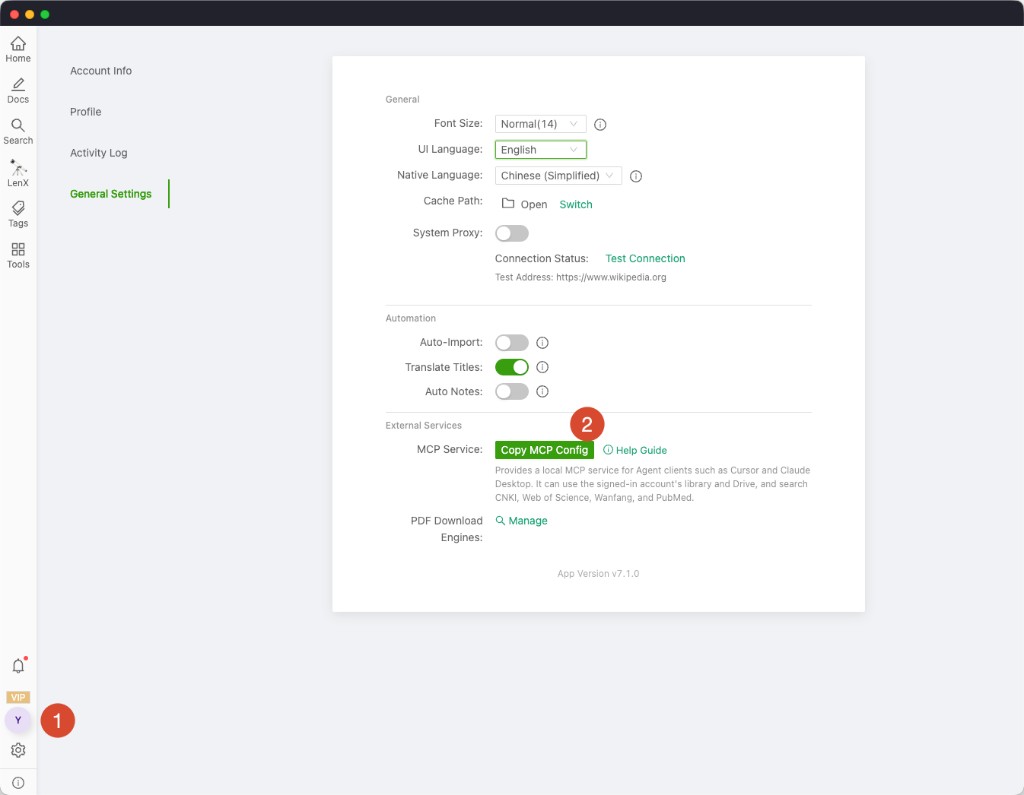
Paste
Paste it to your desktop AI and let the AI write the configuration itself.
Done
You can ask your AI to search a research topic for you.