ivySCI Research Guide
Management
Read
Write
AI
Pad
Account
Website
  • 中文
  • English
Management
Read
Write
AI
Pad
Account
Website
  • 中文
  • English
  • ivyCite Installation
    • Add-in Installation
    • Issues and Solutions during Installation and Use
    • Login and Logout
  • ivyCite Usage
    • Adjusting reference formats
    • How to insert notes
    • How to Use IvyCite's Translation/Polishing Features
  • Issues after Finalizing the Manuscript
    • What is the finalize Manuscript?
    • Add cross-references after finalizing
    • How to convert references in tables to plain text after finalization?
    • Adjustment of reference format issues in the table
  • ivyWrite User Guide

Add cross-references after finalizing

To keep clickable links from in-text citations to the matching bibliography entries after you finalize, turn on Add cross references in the finalize confirmation dialog. After finalization, readers can click a citation to jump to its reference entry.

In Confirm to Finalize Manuscript, complete the backup step (for example, type Backup as instructed), enable Add cross references, then choose Finalize:
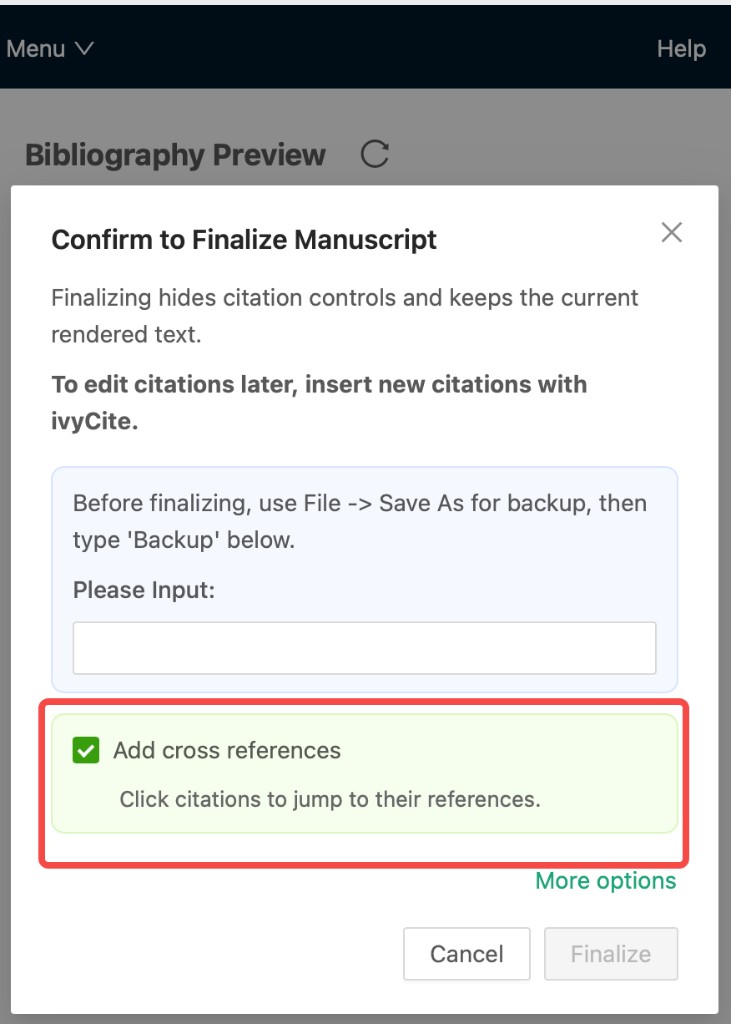
Enable Add cross references when finalizing

Note: If your document has a large number of citations (for example, more than about 100 in-text citation locations), finalization may take much longer with this option enabled. Save a backup beforehand and allow extra time. You can also run finalization when the computer is less busy.

Prev
What is the finalize Manuscript?
Next
How to convert references in tables to plain text after finalization?